
 Intake Chat™
How many leads do you
need to hit your goals?
need to hit your goals?
Back
Add widget to your website and let it shine
Your ZillaMetrics Chat is ready! Add it to your website and start helping your customers right away.
Copy code
and paste it before the closing </header> tag to install on your website.
<script src="https://cdn.zillametrics.com/chat-widget.js"></script>
<link href="https://cdn.zillametrics.com/chat-widget.css" rel="stylesheet">
<script src="https://cdn.zillametrics.com/widget-bundle.js"></script>
<script>
</script>
<link href="https://cdn.zillametrics.com/chat-widget.css" rel="stylesheet">
<script src="https://cdn.zillametrics.com/widget-bundle.js"></script>
<script>
</script>
Install WordPress Plugin
Follow these simple steps to add ZillaMetrics Chat to your WordPress site using our plugin.
Step 1: Copy Your License Key
You will need this license key to activate the plugin on your WordPress site.
 copy
copy
Step 2: Install and Activate the Plugin
Install the ZillaMetrics Chat plugin directly from the official WordPress plugin directory.
- Log in to your WordPress admin dashboard.
- Navigate to Plugins → Add New.
- Search for "ZillaMetrics Chat" in the search box.
- Click "Install Now" and then "Activate Plugin".
Step 3: Enter Your License Key
Once the plugin is activated, click the "Enter License Key" button, input your license key in the field, and click "Save License" to complete the setup.
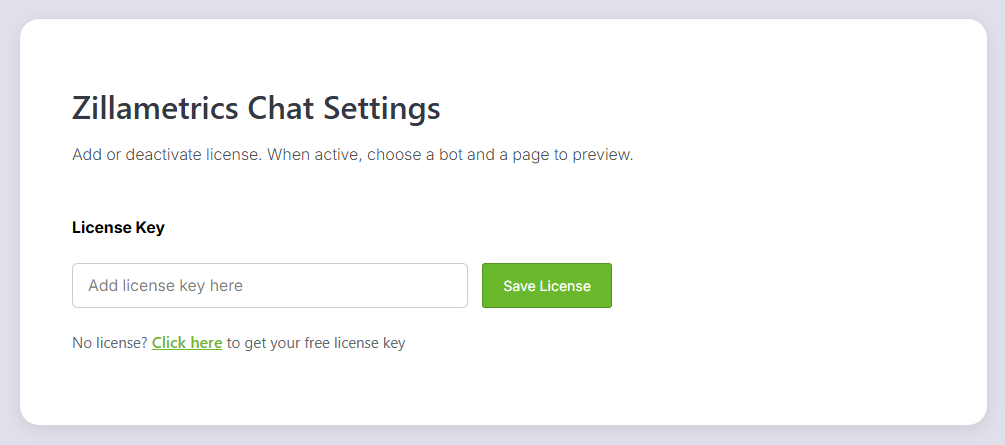
That's it! Your ZillaMetrics Chat widget will now appear on your WordPress site.